

Hello Readers,
Taking a dive into Copilot features during a break from work, and I thought of compiling a guide. Hope you find it beneficial.
What is copilot?
Dynamics 365: Copilot for Dynamics 365 is an AI-powered tool designed to enhance the productivity and efficiency of various business teams, including sales, support, supply chain management, finance, and marketing. Operating within a chat interface, Copilot offers quick summaries of sales opportunities, lead updates, meeting preparations, account-related news, and more. Seamless integration with Outlook and Teams facilitates improved data management, and its generative AI capabilities enable users to summarize records and generate email content effortlessly. Copilot stands as a valuable ally for streamlining operations and facilitating intelligent insights within Dynamics 365.
Microsoft 365: Copilot for Microsoft 365 signifies a transformative approach to work, introducing a collaborative environment between AI and employees for heightened productivity. Recognizing the contemporary challenge of an accelerating work pace, Copilot aims to address the struggle of individuals managing time and energy. Business leaders now acknowledge the value of AI, not just for reducing workloads but for enhancing overall productivity.
This innovative tool, utilizing Large Language Models (LLMs) and tapping into Microsoft Graph business data, reshapes the digital work landscape. Going beyond a mere ChatGPT integration, Copilot serves as a sophisticated orchestration engine seamlessly embedded in Microsoft 365 applications such as Teams, Word, Outlook, PowerPoint, and Excel. Its goal is to not only inspire creativity but also elevate productivity and cultivate new skills. Copilot stands as a fusion of LLM strengths with Microsoft 365 apps, leveraging proprietary business data within Microsoft Graph.
Which applications within Microsoft 365 and Dynamics 365 are compatible?
| Family | Apps |
| Microsoft 365 | Word, Excel, PowerPoint, Outlook, Teams, and Loop |
| Dynamics 365 | Dynamics 365 Business Central Dynamics 365 Customer Service Dynamics 365 Customer Insights Dynamics 365 Customer Insights – Journeys Dynamics 365 Field Service Dynamics 365 Project Operations Dynamics 365 Sales Dynamics 365 Commerce Dynamics 365 Finance Dynamics 365 Supply Chain Management |
What are the license requirements?
| Family | License 1 | License 2 |
| Microsoft 365 Microsoft 365 | Microsoft 365 E3 | Copilot for Microsoft 365 (USD $30) |
| Microsoft 365 E5 | Copilot for Microsoft 365 (USD $30) | |
| Dynamics 365 Dynamics 365 Dynamics 365 Dynamics 365 Dynamics 365 Dynamics 365 | Dynamics 365 Sales Premium | N/A |
| Dynamics 365 Customer Service Enterprise | N/A | |
| Dynamics 365 Customer Service Enterprise with customer service add-in (for chat response and conversation summary) | N/A | |
| Dynamics 365 Sales Professional | Microsoft Sales copilot (USD $40) | |
| Dynamics 365 Customer Service Professional | Microsoft copilot for Service (USD $50)* This is purely a guess, I can’t find it anywhere in documentation as of 29/12/2023 | |
| Dynamics 365 Customer Insights | N/A |
What are some of the features of copilot?
| Family | App | Features |
| Microsoft 365 | Word | • Draft with copilot • Chat |
| PowerPoint | • Draft with copilot • Chat • Light commanding copilot Chat Light commanding | |
| Loop | • Collaborative content creation | |
| Outlook | • Draft with copilot • Summarize • Coaching tips | |
| Teams | • Chat • Meetings • Whiteboard | |
| OneNote | • Draft with copilot | |
| Dynamics 365 | Sales | • Record summarization • Recent changes • Meeting preparation • Email assistance • News updates |
| Customer Service | • Summarize a case and conversation • Respond to questions • Compose an email • Draft a chat response • Ask a question about knowledge base sources | |
| Customer Insights – Journeys | • Style your emails with AI-assisted themes • Kickstart email creation • Refresh and perfect your message • Create journeys • Target the right customers using query assist | |
| Field Service | • Work order recap • Work order creation | |
| Business Central | • Enhance bank reconciliation • Marketing text suggestions • AI generated product description and mappings | |
| Project Operations | • Task plan generation • Risk assessments • Project status reports |
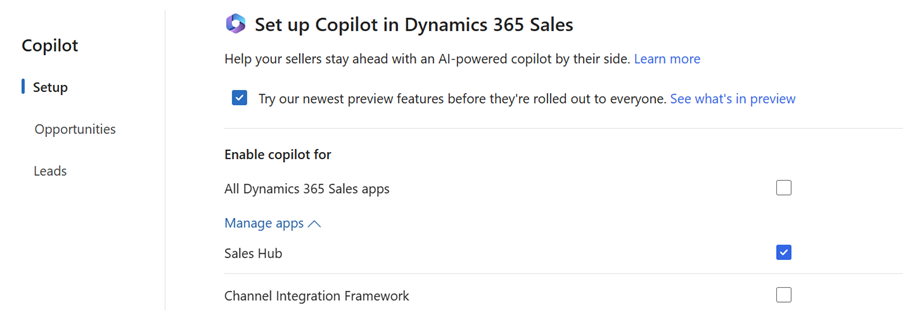
How to enable copilot for Dynamics 365 Sales
Sales Hub >> App settings (Area) >> General Settings>> Copilot>> Setup
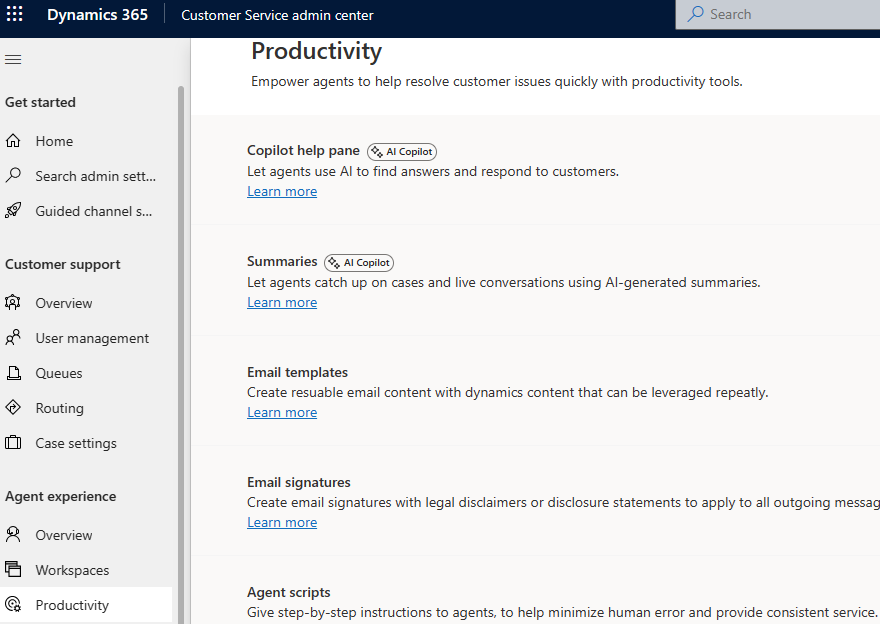
How to enable copilot for Dynamics 365 Customer Service
Customer service admin centre>> Agent Experience>> Productivity
Customer service admin centre>> Operations>> Insights
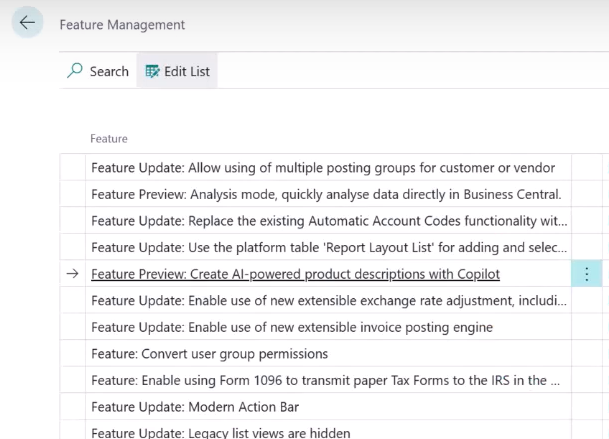
How to enable copilot for Dynamics 365 Business Central
App>> Feature Management>> Create AI-powered product descriptions with copilot (or others)>> enable
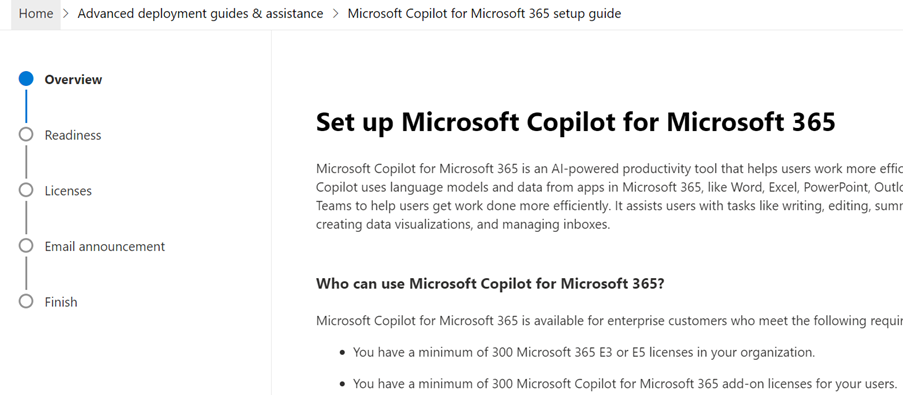
How to enable copilot for Microsoft 365
- Go to https://admin.microsoft.com/Adminportal/Home?Q=learndocs#/modernonboarding/microsoft365copilotsetupguide
- Assign required licences
What about copilot extensibility?
There are many ways to customize Copilot; following three are most popular:
- Graph connectors
- Plugins (Preview)
- Power Platform connectors
Prerequisites
If you have the right licenses, it is assumed that all users will have Microsoft Entra ID.
Prerequisite by apps here: https://learn.microsoft.com/en-us/microsoft-365-copilot/microsoft-365-copilot-requirements
Limitations
- Microsoft 365 Chat does not currently support Conditional Access policies configured directly to the SharePoint Online app.
- The effectiveness of Copilot’s knowledge-based functions, such as asking a question, composing an email, and drafting a chat response, relies on the availability of high-quality and current knowledge articles for reference.
- To activate Copilot, it is necessary to share certain data with Azure OpenAI geography.
- Minimum 300 users for Microsoft 365 E3 or E5
References
https://learn.microsoft.com/en-us/microsoft-cloud/dev/copilot/copilot-for-dynamics365
https://learn.microsoft.com/en-us/dynamics365/sales/enable-setup-copilot

 DIY D365
Nice info
LikeLike