Every Power Automate (MS Flow) Filter Query You Ever Wanted To Know As A Functional Consultant
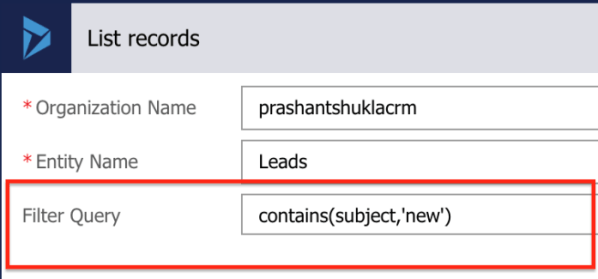
Hello Readers This blog is to help fellow consultants to start their journey on Power Automate. We all know how easy it is to create a flow (Watch #TGIF Episode 2 here, if not already). I am sure as a Business user or a functional consultant, you must have had a situation where you needed... Continue Reading →

#TGIF Episode 1: Getting Started With Microsoft Flow

Hi Readers and Viewers In this episode of TGIF, we are going to see that how you and me can start our Flow journey. This is a short episodes and will cover the following: Licensing Sign up Start page Enter a process name Check templates Check out the mobile app Have you got the reason... Continue Reading →

New Series #TGIF, Thank God It’s Flow

Hi Readers and Viewers Thanks for your support! As promised, I am coming up with a new series #TGIF. It took some time to decide upon a name. I will be releasing episodes every friday starting 8th November 2019. Today is just the teaser and my thoughts. In this series we will be covering everything... Continue Reading →

How To Update An Opportunity From Opportunity Close And Send An Email on Opportunity Close, Using MS Flows? (No Code Solution)

Hello Readers & Viewers In this video, i am showing 'How to send an email with information from Opportunity Close form, using MS Flows?'. This flow will also help you to update opportunities from opportunity close form, it's the same concept. Many of you might know that using the native workflow functionality of Dynamics 365... Continue Reading →

Patient Management App

Hello Readers In this blog, I am going to show you how you can utilise Power Platform and quickly create an app for your clinics. I have used both Canvas and Model driven App. Let's have a look: Canvas App This app is made of 9 screens: Home Screen Patient's Home Screen Patient Registration Screen... Continue Reading →

Send an announcement to a Kaizala group via Microsoft Flows whenever you receive an email or you post a blog!

This is a great video on how you can send announcements to a Kaizala Group via Microsoft Flows. Watch the video 🙂 https://youtu.be/c2iFDAgDIjk Hope it helps! Happy CRMing!!

A WordPress.com Website.

Up ↑